Focus on what matters.
Expanse Planner is a family of small, focused apps for the decisions people make together, and for the advisors who help them. One job each, done well. A file you own. Nothing collected. More time for the person in front of you.
Now

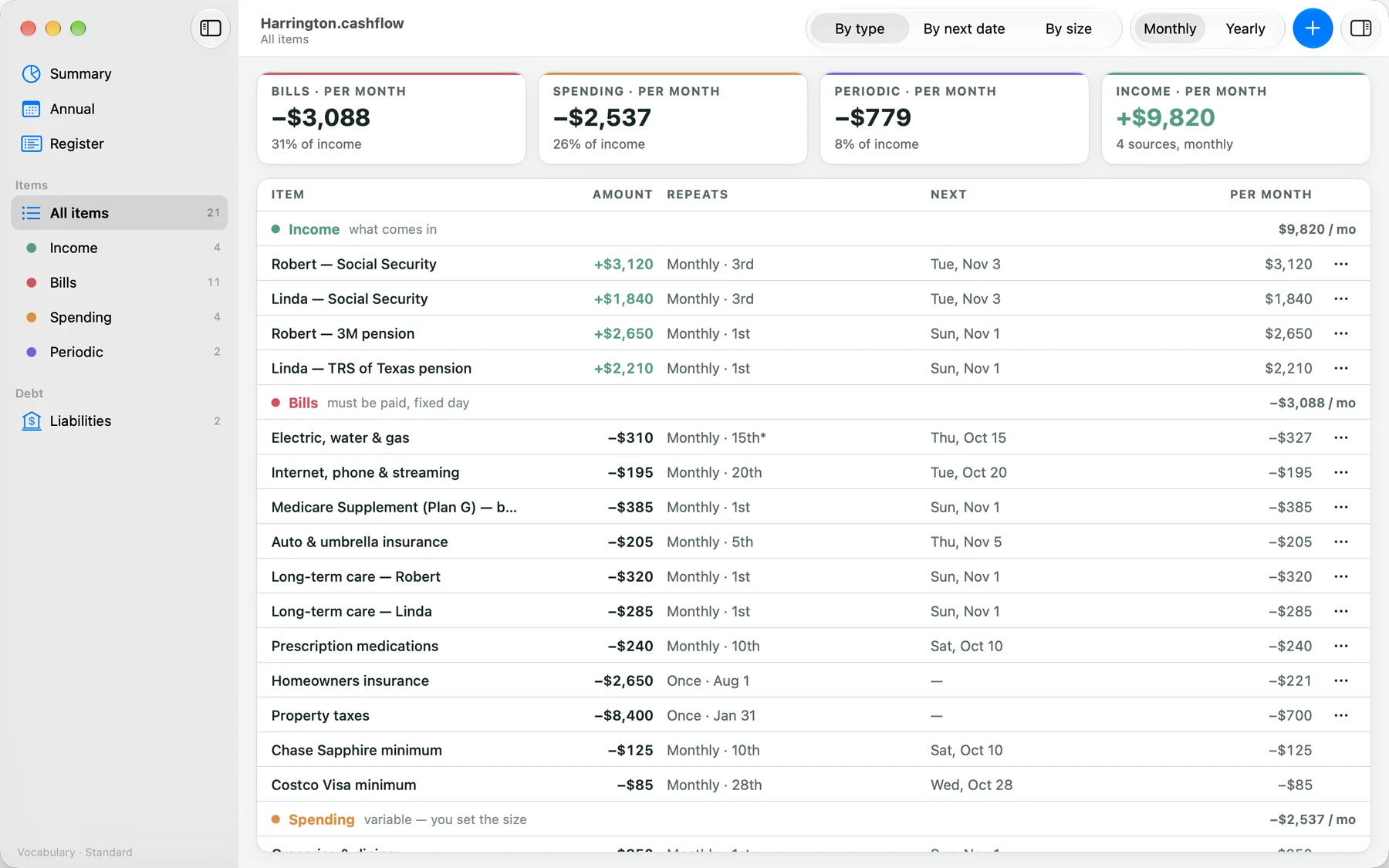
Cashflow
Your cashflow, in one file.
What comes in, what goes out, and what you owe, month by month and year by year. It works the same on iPhone, iPad and Mac, and the file lives wherever you keep it.
Now: testing with a small group.
How every Planner app works
- A file, not an account
- What you enter is a document. Open it from the Files app, iCloud Drive or a folder on your Mac. Keep it in iCloud Drive and every device sees it. Share it from Files with the people you plan with.
- Nothing collected
- No account with us, no sign-in, no server and no analytics. The apps send nothing to us. Our privacy policy is short because there is little to say.
- One job, done well
- Each app is one area of a plan, designed for iPhone, iPad and Mac, with the words it needs and nothing else. Open it, do the thing, close it.
- Estimates, not advice
- What an app works out from your numbers is a projection, not a recommendation. Expanse Planner apps give no financial, tax, legal or investment advice.
Ahead
One area at a time.
Each app is one part of a plan, with its own symbol on the family’s teal tile. The colour tells them apart on a home screen; the shape says what each is for. Cashflow is first.
-

Cashflow
Now
Income, bills, spending and debts, month by month.
-
Goals
Ahead
What a household is working towards, with its stages and actions.
-

Taxes
Ahead
Each tax year’s notes and documents, kept as things arrive.
-

Insurance
Ahead
The policies a household holds, the people on them, and the dates to watch.
-

Estate Planning
Ahead
Each person’s essential documents, who they name, and when they were reviewed.
Goals

What you’re working towards, on one page.
The people, what they stand for, and each goal with where it stands and the next action. The part of a plan that is about the people, not the numbers, and the reason the numbers matter.
Taxes

Each tax year, as things arrive.
A page for each tax year: the notes as things come up, the documents filed against it, and the retirement account distributions to keep in view. The record a household and its advisor keep together, not a return.
Insurance

The policies, the people on them, the dates to watch.
Each policy and annuity a household holds, who it covers and who it names, and the renewals and reviews coming up, so the conversation about what is covered starts from what is there.
Estate Planning

The essential documents, who they name, when they were reviewed.
For each person, the will, the powers of attorney and the directives, who holds them and who they name, and when each was last looked at, so nothing important is a surprise.


Where it comes together
For advisory firms
For advisors, the areas come together in a planner: one file for each household, with its goals, cashflow, meetings, notes and tasks, kept wherever the firm keeps client files. Expanse Compliance lets a firm make its compliance decisions once and have every planner follow them.
We are working towards it one app at a time. The apps you can use today are the way there, and the same files open in the planner.
Guides
Short, step-by-step guides for each app, in the same words the app’s own Help uses.